
10 tips for using the Bay Area Shine app
These tips work in the web app on any device.
A few small habits make every clean go smoother. Here are ten ways to get the most from the app.
1. Set up your home once
Add your address, home size, rooms, pets, the products you like or want avoided, parking and how to get in. It takes about two minutes, and every clean after that starts from it.
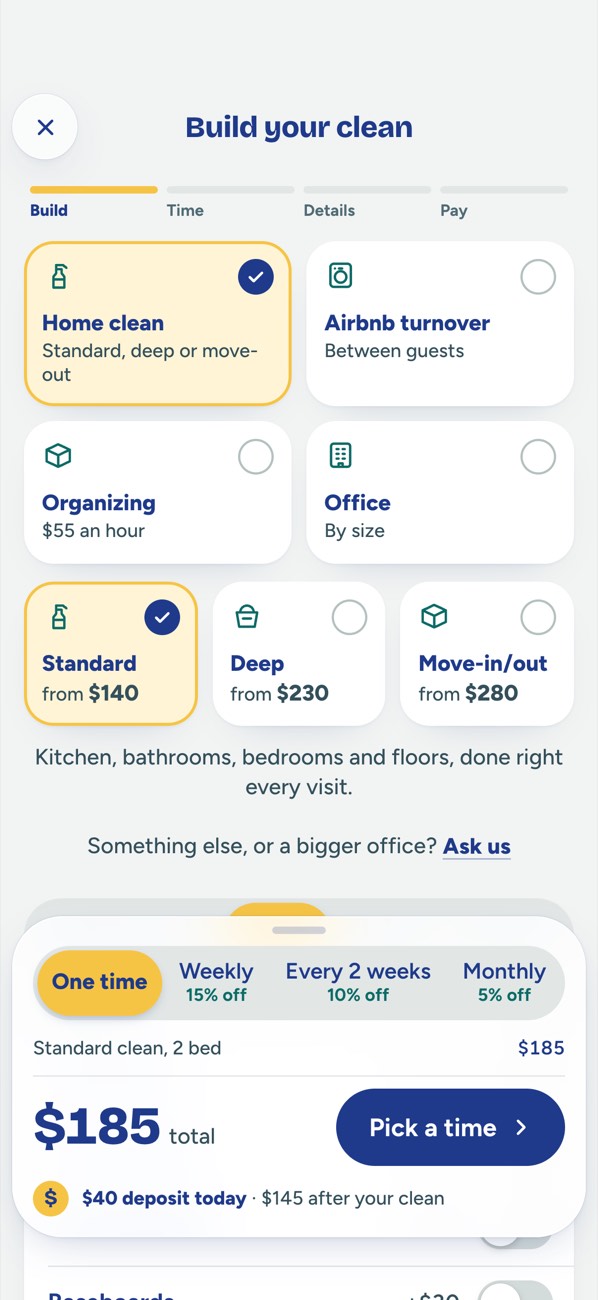
2. See the price before you pay
Pick your clean, your home size and any extras, and the app shows the price before you pay. The $40 deposit holds your time and comes off your total (there's no deposit on our plans).
3. Choose "Around then" or "Exactly then"
You pick the day and the start time. "Around then" means your cleaner arrives within an hour either way. "Exactly then" means at that time. Once a cleaner is chosen, we confirm their arrival time.
4. Choose your cleaner, or let us pick
Cleaners apply for your clean. Choose one yourself, or let us pick for you. Either way, you always see who's coming before the day: their first name, photo, rating and reviews. If your cleaner brings a helper, you see them too, and you can say no up to 24 hours before.
5. Keep your door code in the locked field
If you won't be home, put your door or gate code in the app's locked code field, never in a chat or a text. Only your cleaner (and any helper on your clean) sees it, from an hour before your start time until they leave.
6. Mark rooms you don't want photographed
Your Shine Report has photos of each room. If there's a room you'd rather keep private, mark it "no photos" and it won't be photographed.
7. Follow your clean on the day
The day before, you get a reminder and a quick checklist. On the day, you can see when your cleaner is on the way, has arrived, and is all done.
8. Check your Shine Report, and flag anything missed
After the clean, your Shine Report shows photos of each room. Missed a spot? Tap Flag a spot within 24 hours and we come back to fix it, free.
9. Message us and your cleaner in the app
Messages are the fastest way to reach us, and our replies show up right there. Messages with your cleaner stay in the app, so you both keep your contact details private.
10. Move a clean for free, and tip if you like
Need a different day? Move your clean free in the app up to 48 hours before it starts. Tips are optional: add one when you book or after the clean, and 100% goes to your cleaner.
Book in the app
Open the web app on any device. No download needed.
- Book your clean and see the price before you pay.
- See who's coming before the day: first name, photo, rating and reviews.
- Follow it on the day: on the way, arrived, all done.
- Get your Shine Report: photos of each room, so you can see the difference.
No download needed: book in the web app on any device. An iPhone app on the App Store will follow.